Welcome to EditProTips! Video editing has become easier, faster, and more creative with the power of Artificial Intelligence (AI). Whether you are a beginner, content creator, YouTuber, or professional video editor, AI video editing software can help you create stunning videos without spending hours on complicated editing tasks.
In 2026, AI-powered editing tools are changing the way people create videos for YouTube, Instagram Reels, TikTok, Facebook, and other social media platforms. From automatic captions and background removal to AI effects, transitions, and video enhancement, these tools make video editing more accessible than ever.
In this article, we will explore AI video editing software, its best features, benefits, and how you can use AI tools to create professional-quality videos.
Table of Contents
What Is AI Video Editing Software?
AI video editing software is a video editing application that uses Artificial Intelligence to automate and improve different editing tasks. It helps users edit videos more efficiently by analyzing video clips, recognizing objects, generating captions, removing backgrounds, and applying intelligent effects.

Instead of performing every editing task manually, users can use AI-powered features to save time and improve video quality.
These tools are useful for:
- YouTube video creators
- Instagram Reels creators
- TikTok content creators
- Professional video editors
- Beginners and students
- Digital marketers
- Social media influencers
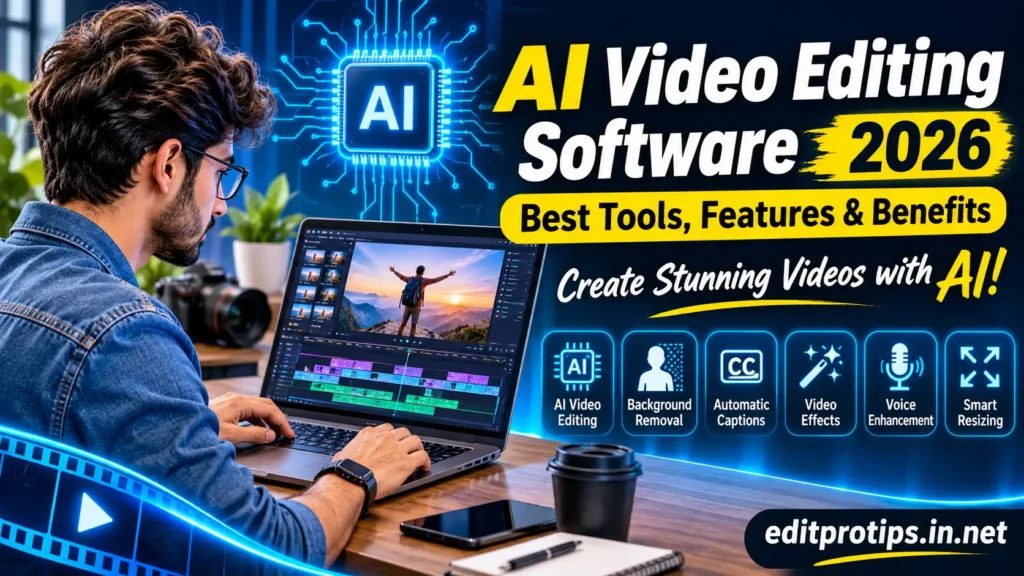
Best Features of AI Video Editing Software
Modern AI video editors offer several useful features that make video creation easier.
1. Automatic Video Editing
AI can analyze your video clips and automatically select important moments, remove unnecessary sections, and create a polished video.
2. AI Background Removal
Background removal allows you to remove or replace video backgrounds without using a professional green screen.
3. Automatic Captions and Subtitles
AI caption generators can recognize spoken words and automatically convert them into subtitles. This is especially useful for short-form videos and social media content.
4. AI Video Effects
AI-powered effects help creators add creative animations, visual enhancements, transitions, and stylish effects to their videos.
5. Text-to-Video Generation
Some AI platforms allow users to generate video clips from written descriptions. You simply enter a text prompt, and the tool creates visual content based on your instructions.
6. AI Voice Enhancement
AI audio tools can reduce background noise, improve voice clarity, and make recordings sound more professional.
7. Smart Video Resizing
AI-assisted resizing helps creators adjust videos for different platforms, including YouTube, Instagram, TikTok, and Facebook.
Best AI Video Editing Software in 2026
Choosing the right AI video editing software depends on your editing requirements, experience, and budget. Here are some popular options worth exploring.
1. CapCut
CapCut is a popular video editing application for short-form content and social media videos. It offers creative editing tools, automatic captions, effects, transitions, and various AI-powered features.
Best For: TikTok videos, Instagram Reels, YouTube Shorts, and beginners.
2. Adobe Premiere Pro
Adobe Premiere Pro is a professional video editing application with AI-powered features that help editors improve their workflows. It is suitable for advanced video editing, professional projects, and high-quality productions.
Best For: Professional video editors and filmmakers.
3. Wondershare Filmora
Filmora provides an easy-to-use editing experience with creative effects, templates, audio tools, and AI-assisted features.
Best For: Beginners, YouTubers, and social media creators.
4. DaVinci Resolve
DaVinci Resolve is a powerful editing and color-grading application. Its advanced AI-powered features help professionals work with video, audio, and visual effects.
Best For: Professional editing, color grading, and filmmaking.
5. Runway
Runway offers AI-powered creative tools for generating and transforming video content. It is particularly useful for creators interested in experimenting with generative AI.
Best For: AI-generated videos and creative visual content.
6. Descript
Descript provides a text-based video editing workflow. Users can edit video and audio by working with automatically generated transcripts.
Best For: Podcasts, interviews, tutorials, and talking-head videos.
7. VEED.IO
VEED.IO is an online video editing platform with AI-assisted tools for captions, subtitles, audio enhancement, and content creation.
Best For: Online editing and social media content.
Benefits of Using AI Video Editing Software
AI video editing software provides several advantages for beginners and professional creators.
1. Saves Time: AI automates repetitive editing tasks and helps creators complete projects faster.
2. Easy to Use: Many AI editing applications offer simple interfaces that beginners can understand.
3. Improves Video Quality: AI enhancement features can improve visuals, audio, and overall presentation.
4. Creates Professional Content: AI-powered effects, transitions, and captions help make videos more engaging.
5. Reduces Manual Work: Tasks such as background removal, subtitle generation, and audio cleanup can be automated.
6. Supports Social Media: Creators can prepare videos in different formats for multiple social media platforms.
How to Use AI Video Editing Software
Follow these simple steps to create an engaging video using an AI-powered editor.
- Choose an AI Video Editor: Select an application that matches your editing requirements.
- Upload Your Video: Import your recorded clips, images, and audio files.
- Use AI Features: Apply automatic captions, background removal, or other available AI tools.
- Add Effects and Transitions: Make your video more attractive with suitable visual effects.
- Adjust Audio: Improve sound quality and add background music when appropriate.
- Preview Your Video: Check the final result and make any necessary changes.
- Export Your Video: Choose the required resolution and aspect ratio before exporting.
How to Choose the Best AI Video Editing Software
Before selecting an AI video editor, consider the following factors:
- Easy Interface: Choose software that is simple to understand and operate.
- AI Features: Check whether it offers captions, background removal, video enhancement, and automation.
- Export Quality: Look for suitable video resolution and export options.
- Pricing: Compare free and paid plans before making a decision.
- Device Compatibility: Make sure the software supports your computer, smartphone, or operating system.
- Watermarks: Check whether the free version adds a watermark to exported videos.
- Editing Performance: Consider your device specifications and the software’s performance.
AI Video Editing Software for Different Creators
Different creators have different editing needs. Here are some common use cases.
| Creator Type | Recommended Editing Needs |
|---|---|
| YouTubers | Long-form editing and audio enhancement |
| TikTok Creators | Short videos and trending effects |
| Instagram Creators | Reels, transitions, and captions |
| Beginners | Simple editing and ready-made templates |
| Professionals | Advanced editing and color grading |
| Businesses | Marketing videos and promotional content |
Is AI Video Editing Software Free?
Yes, several AI video editing applications offer free versions or limited free plans. However, some advanced features may require a paid subscription.
Free versions may include basic editing, limited AI features, export restrictions, or watermarks.
Before choosing a free editor, check its available features, export quality, subscription conditions, and usage limits.
Future of AI Video Editing in 2026
Artificial Intelligence is continuously transforming the video editing industry. AI technology is making it possible to create videos with fewer manual steps and more creative control.
Some important developments include:
- More advanced text-to-video generation.
- Automatic scene selection and editing.
- Realistic AI-generated visual effects.
- Improved voice enhancement and audio generation.
- Intelligent video resizing and formatting.
- Faster editing workflows for social media creators.
- More personalized video editing features.
As AI technology continues to improve, video creation is expected to become more accessible to beginners and professionals.

Frequently Asked Questions
What is the best AI video editing software in 2026?
The best option depends on your requirements. CapCut and Filmora are popular choices for beginners, while Adobe Premiere Pro and DaVinci Resolve offer advanced editing capabilities.
Can I edit videos using AI for free?
Yes, some video editing applications provide free versions with basic editing and selected AI features. However, advanced tools may require payment.
Which AI video editor is best for beginners?
CapCut and Filmora are beginner-friendly options because they offer accessible editing interfaces and useful creative tools.
Can AI automatically edit videos?
Yes, some AI tools can analyze video footage, select important scenes, generate captions, and automate parts of the editing process.
Is AI video editing software useful for YouTube?
Yes, AI video editing software can help YouTubers create tutorials, Shorts, promotional videos, and other types of content more efficiently.
Conclusion
AI video editing software is making video creation faster, easier, and more creative in 2026. Whether you want to create YouTube videos, Instagram Reels, TikTok content, or professional promotional videos, AI-powered editing tools can help you achieve better results.
From automatic captions and background removal to AI effects and text-to-video generation, these features provide new opportunities for content creators. Choose the right software according to your needs, experiment with its features, and start creating amazing videos.
Thanks for visiting EditProTips! Keep creating, keep editing, and stay updated with the latest AI tools and editing trends.