Hello friends! Welcome back to EditProTips. Today, we are sharing a trending Gemini Modi Ji Handshake Prompt 2026 that you can use to create an AI-generated photo showing a respectful handshake scene with Indian Prime Minister Narendra Modi.
With AI photo editing tools such as Google Gemini, users can transform their ideas into creative and realistic-looking images by using detailed prompts. The Gemini Modi Ji Handshake Prompt is useful for creators who want to experiment with AI photography, political-themed creative images, and realistic scene generation.
In this guide, you will find a ready-to-use prompt, tips for getting better results, and instructions for creating your AI photo.
Table of Contents
What Is the Gemini Modi Ji Handshake Prompt?
The Gemini Modi Ji Handshake Prompt is a text prompt designed to help generate an AI image depicting a person respectfully shaking hands with Narendra Modi in a professional setting.
Instead of manually creating the scene in an image editor, you can provide Gemini with a detailed description of the desired composition, clothing, lighting, background, camera angle, and overall atmosphere.
For the best results, use your own photo as a reference image if the tool supports image uploads and clearly state that the person’s identity and facial features should remain consistent.
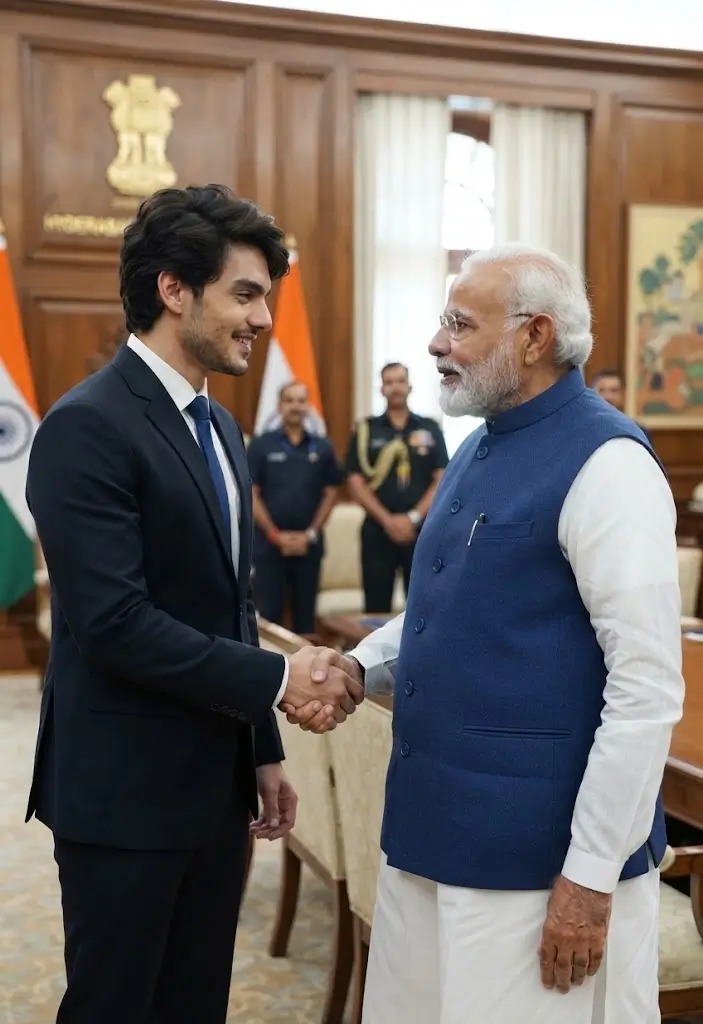
Gemini Modi Ji Handshake Prompt 2026
Create a realistic, high-quality editorial-style photograph of me respectfully shaking hands with Narendra Modi during a formal public meeting. Preserve my uploaded face and identity accurately, keeping my facial features, hairstyle, skin tone, and overall appearance consistent with the reference photo. Narendra Modi should appear recognizable and dressed in his formal traditional attire.

Show both people standing naturally and exchanging a respectful handshake. Use realistic body proportions, natural hand positioning, authentic facial expressions, and professional posture. Place the scene in an elegant official meeting environment with a subtle Indian government-style background.

Use realistic photography, natural skin texture, soft professional lighting, sharp facial details, accurate shadows, realistic clothing textures, and a documentary/editorial photography style. Make the composition look natural and believable while clearly presenting it as an AI-generated creative image. High resolution, detailed photography, realistic depth of field, clean composition, 4K quality.
How to Use the Gemini Modi Ji Handshake Prompt
Creating an AI-generated handshake image is simple when you provide Gemini with a clear reference image and detailed instructions.
Step 1: Choose a Clear Photo
Select a high-quality photograph of yourself. A front-facing or slightly angled portrait with good lighting usually works better.
Step 2: Open Gemini
Open Google Gemini and use its image-generation or image-editing capabilities available to your account.
Step 3: Upload Your Reference Photo
Upload your selected image if image upload is supported. Tell Gemini that the uploaded image should be used as the facial reference.
Step 4: Copy the Prompt
Copy the Gemini Modi Ji Handshake Prompt from this article and paste it into Gemini.
Step 5: Generate the Image
Ask Gemini to create the image. If the first result does not look natural, refine the prompt by adjusting the background, clothing, lighting, camera angle, or pose.
Step 6: Check the Result
Before sharing the image, carefully check the hands, face, body proportions, clothing, and background. AI-generated images can sometimes contain visual errors.
Tips for Better Gemini AI Photo Editing
To create a more convincing result, follow these simple tips:
Use a High-Quality Reference Image
A clear reference photo gives the AI more useful information about facial features and appearance.
Describe the Scene Clearly
Mention the location, pose, lighting, clothing, camera style, and background you want. More specific instructions can help produce a more consistent composition.
Keep the Prompt Natural
Avoid adding too many contradictory instructions. A simple but detailed prompt is generally easier for an AI image generator to interpret.
Ask for Realistic Hands
Hands can sometimes be difficult for AI image generators. Include instructions such as realistic hand positioning, five natural fingers, accurate proportions, and a natural handshake.
Try Different Backgrounds
You can experiment with a formal meeting room, event stage, official reception area, or neutral professional background.
Best Background Ideas
You can modify the prompt and try different settings, such as:
- Formal government meeting room
- Professional conference venue
- Public event stage
- Official reception area
- Elegant indoor auditorium
- Neutral studio-style background
- Professional outdoor event setting
Choose a background that matches the type of image you want to create.
Why Gemini AI Photo Prompts Are Popular
AI photo prompts have become popular because they allow users to experiment with creative photography without advanced editing skills.
A well-written prompt can describe the entire scene, including:
- Facial appearance
- Clothing
- Pose
- Background
- Lighting
- Camera angle
- Image quality
- Photography style
This makes AI photo editing accessible to beginners as well as experienced creators.
Important Note About AI-Generated Images
Images created using AI can look highly realistic. When creating or sharing an image featuring a real public figure such as Narendra Modi, it is important to make it clear that the image is AI-generated and does not represent a real event unless the event actually occurred.
Do not use an AI-generated image to falsely suggest that a real meeting or interaction happened.
For social media posts, adding a simple label such as “AI-generated image” can help viewers understand the context.
Gemini Modi Ji Handshake Prompt for Social Media
If you want to create an image specifically for Instagram, Facebook, or other social platforms, you can add instructions such as:
Create a vertical 9:16 composition suitable for social media. Keep both people clearly visible from the waist up, maintain natural proportions, use cinematic but realistic lighting, and leave some clean space around the subjects for social media presentation.
This can help make the generated image better suited for mobile viewing.
Frequently Asked Questions
What is the Gemini Modi Ji Handshake Prompt?
It is a detailed AI image-generation prompt designed to create a creative handshake scene involving the user and Narendra Modi.
Can I use my own photo with this Gemini prompt?
Yes, when Gemini’s image-editing features allow reference-image uploads, you can provide a suitable photo and ask the AI to maintain your facial appearance.
How can I make the AI handshake look realistic?
Use a clear reference photo and include detailed instructions about hand position, body proportions, lighting, facial details, and camera perspective.
Can I change the background?
Yes. You can modify the prompt to request a meeting room, event venue, reception area, stage, or another suitable setting.
Is the generated photo a real photograph?
No. If the image is generated or substantially edited by AI, it should be treated as an AI-generated creative image rather than evidence of a real meeting or event.
Can I post the AI image on social media?
You can share AI-generated creative content subject to the platform’s rules and any applicable laws. It is a good practice to clearly identify realistic images of public figures as AI-generated.
Conclusion
The Gemini Modi Ji Handshake Prompt 2026 is a creative way to explore AI-powered photo generation and editing. With a clear reference photo and a detailed description, you can experiment with realistic-looking compositions, professional backgrounds, lighting, and photography styles.
Remember to use AI-generated images responsibly, especially when they feature public figures. Clearly identifying synthetic content can help prevent viewers from confusing a creative AI image with a real photograph.
For more Gemini AI prompts, AI photo editing ideas, CapCut templates, VN codes, and creative editing resources, keep visiting EditProTips.
Gemini Modi Ji Handshake Prompt, Gemini AI Prompts, Modi Ji AI Photo, Modi Handshake Prompt, AI Photo Editing 2026, Gemini Photo Editing, AI Photo Prompts, Trending AI Prompts, AI Image Editing, Gemini AI Photo Editing, Narendra Modi AI Photo, AI Generated Photos, EditProTips, EditPro Tips AI