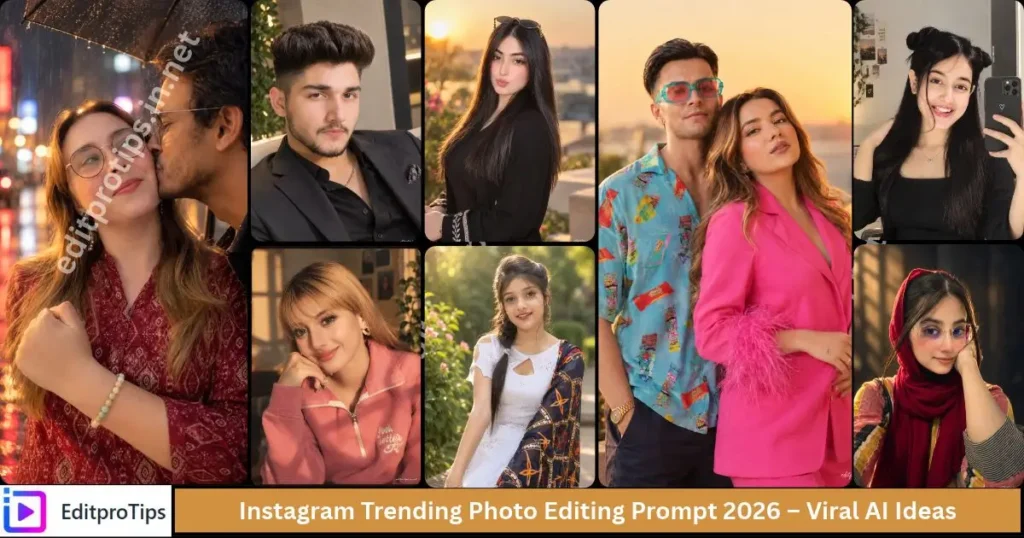
Welcome to EditProTips! Are you looking for the best Photo Editing AI Prompts to transform your ordinary pictures into stunning, professional-looking photographs? AI photo editing tools like Google Gemini make it easier than ever to create realistic lifestyle portraits, beautiful cherry blossom photos, traditional looks, and festive Christmas pictures.
In this article, we have collected 5 trending Photo Editing AI Prompts that you can copy and use with your uploaded photo. These prompts are designed to create ultra-realistic images while maintaining your original facial identity.
Whether you want a stylish café portrait, a beautiful cherry blossom photoshoot, an elegant traditional sari look, or a Christmas winter photoshoot, these AI prompts will help you create amazing pictures.
Table of Contents
What Are Photo Editing AI Prompts?
Photo Editing AI Prompts are text instructions that tell an AI image generator how to edit or transform your uploaded photograph. You can describe clothing, background, hairstyle, lighting, camera angles, poses, and photography styles to achieve your desired result.
With a detailed prompt, you can create professional-style photographs without visiting a photography studio.
5 Best Photo Editing AI Prompts 2026
Here are five carefully written AI photo editing prompts. Copy your favorite prompt and paste it into Google Gemini or another compatible AI image generator.
1. Ultra-Realistic Modern Café Girl Photo Prompt
<text>Best for: Stylish café portraits and modern lifestyle photography.</text>

Ultra-realistic full-body lifestyle portrait of a young woman sitting casually on a minimal wooden chair in a modern café. Muted olive-green rolled-sleeve button-up shirt, white relaxed linen pants, clean white sneakers. One hand in pocket, the other holding a clear glass of dark iced coffee. Round black sunglasses, wristwatch, calm confident expression.

Warm neutral color tone with beige, olive, and white hues. Soft natural daylight, smooth shadows, premium editorial look. Background: light wood café counter, floating wooden shelves with coffee jars, cups, espresso machine softly blurred.

Full-body vertical framing, eye-level camera, shallow depth of field. Scandinavian café aesthetic, clean composition, modern lifestyle photography. Maintain same face and facial features as reference. 8K ultra-realistic. Shot on DSLR, 85mm lens, f/1.8, ISO 100. Signature “editprotips.in.net” bottom right.

2. Cherry Blossom Pink Flower AI Photo Prompt
Best for: Beautiful spring photoshoots with pink sakura flowers.
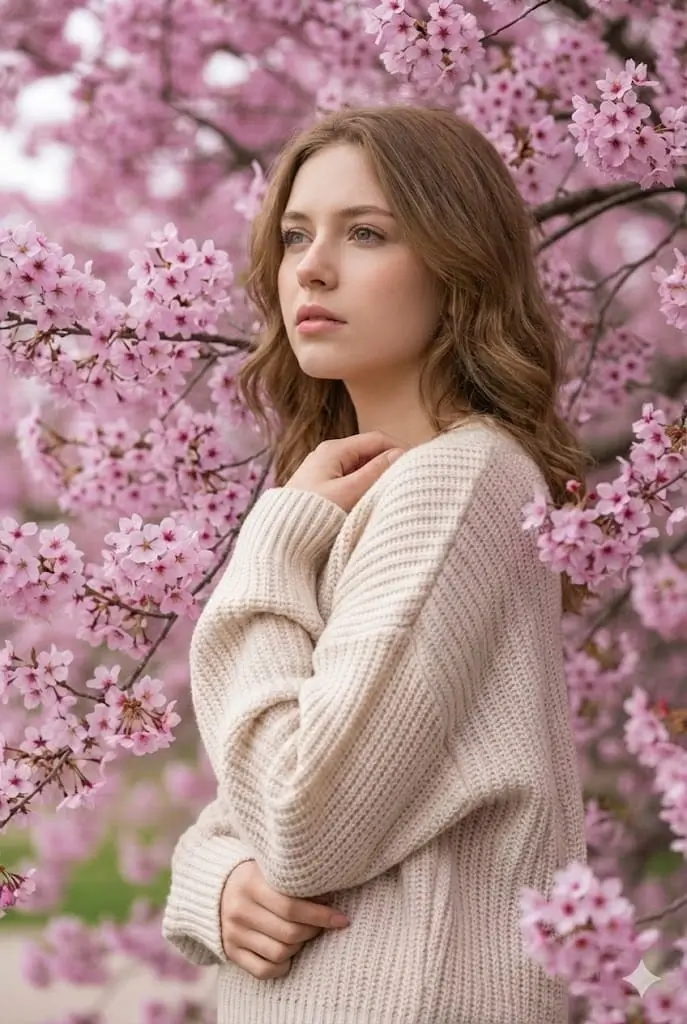
Create an ultra-realistic vertical, medium-shot portrait using the provided reference image strictly for exact face matching.

Do not modify, beautify, stylize, exaggerate, or reinterpret the face in any way. Preserve the exact facial structure, proportions, head size, jawline, cheekbones, eye shape and spacing, nose shape, lips, forehead, skin tone, and natural expression from the reference image.

The subject is positioned among pink cherry blossom (sakura) branches, with the face remaining unchanged from the reference and only the environment, clothing, pose, and lighting being generated.

The woman is shown in a three-quarter profile, gazing upward and slightly to the left with a calm, serene, contemplative expression. Her right hand rests gently on her left shoulder/collarbone.

She wears a cream or oatmeal-colored chunky knit sweater with visible vertical ribbed texture and blue denim jeans.

The scene is surrounded by dense pink cherry blossoms, creating a natural floral frame. Use a shallow depth of field, with soft foreground and background blur, keeping the face as the sharpest focal point.

Lighting is soft, diffused, and even, similar to an overcast spring day. Natural skin texture visible.

Ultra-realistic photography, natural textures, no artistic filters, no face alteration. Shot on DSLR, 85mm lens, f/1.8, ISO 100. Signature “editprotips.in.net” bottom right.
3. Elegant Black Saree AI Photo Editing Prompt
Best for: Traditional Indian fashion and elegant portrait photography.
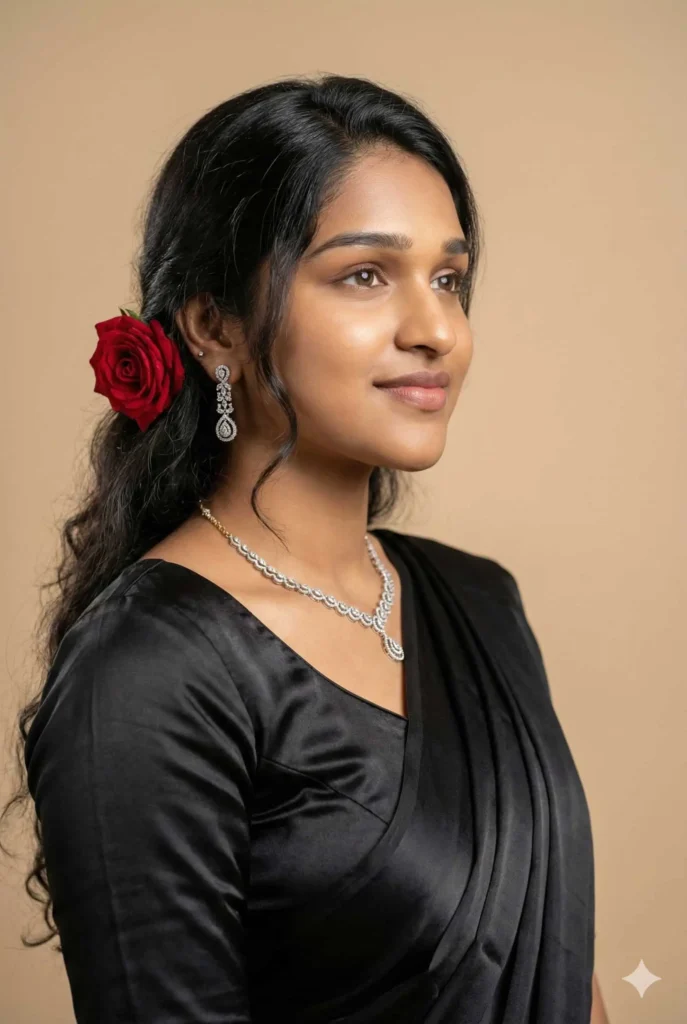
Create an image of me as a young South Asian woman positioned on the left side of the frame, gazing towards the right.

She has dark hair styled in soft waves, with a red rose tucked behind her ear. She appears to be in her early twenties, with a delicate build.

She's wearing a black blouse and satin sari that drapes over her shoulders and arms. Her jewelry includes diamond earrings and a matching necklace.

Her facial expression is soft and serene, with a slight upturn of her lips.

The background is a plain, neutral beige. The lighting is soft and flattering, creating a gentle atmosphere.

The composition emphasizes beauty and elegance. The focus is sharp on the woman, with a slight blur in the background.

The overall style is sophisticated and polished. Keep the face identical to the uploaded image, with no filtration or morphing. Shot on DSLR, 85mm lens, f/1.8, ISO 100. Signature “editprotips.in.net” bottom right.
4. Christmas Winter Photoshoot AI Prompt
Best for: Christmas-themed portraits and winter Instagram photos.
Use the uploaded image only as a face and identity reference.

Preserve the person’s real facial structure, proportions, skin tone, and overall likeness. Do not stylize, beautify, or noticeably alter the face.

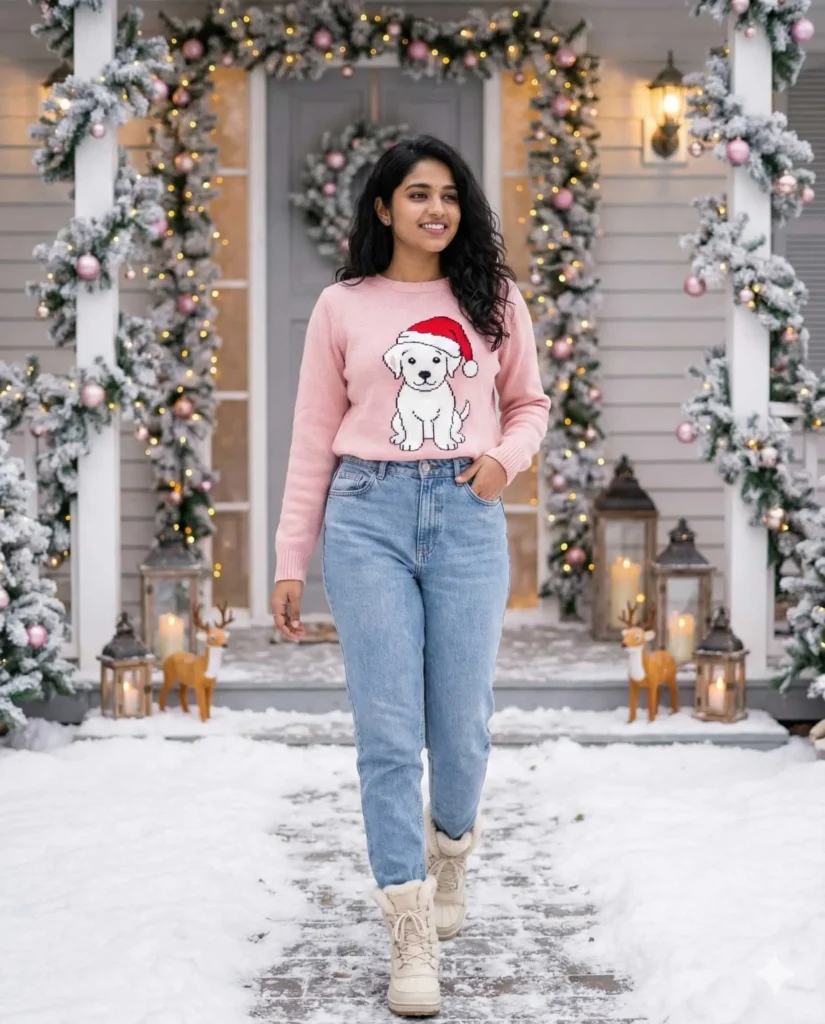
Create a high-resolution Christmas lifestyle photograph of the same woman walking naturally along a snowy pathway toward the camera.

Pose & expression:
The subject is walking in a relaxed, candid manner. Hands are positioned naturally, one hand near the hair or coat. Posture is comfortable and confident. Head angle is slightly turned. Expression is warm, calm, and natural, with a subtle smile.

Outfit:
Long, dark, softly wavy hair worn loose with minimal, natural makeup and realistic skin texture.

She wears a cozy pastel pink knitted sweater featuring a white puppy illustration wearing a red Santa hat. Paired with light blue high-waisted denim jeans and cream winter boots with visible fur lining.

Environment:
An elegant Christmas-decorated house entrance. The doorway is framed with frosted evergreen garlands, warm golden fairy lights, pink ornaments, and subtle snow accents. A festive wreath with a ribbon is centered on the door.

Decorative reindeer figures and lanterns with glowing candles line the snowy pathway.

Lighting:
Soft natural winter daylight blended with warm Christmas lights. Slight background blur for depth.

Face safety rules:
Face must remain true to the uploaded image.
No face reshaping, smoothing, or stylization.
No change in age, gender, or ethnicity.

Style: Ultra-realistic lifestyle photography.
Camera: Full-body shot, natural eye-level perspective.
Mood: Cozy, festive, elegant.
Aspect ratio: 4:5. Shot on DSLR, 85mm lens, f/1.8, ISO 100. Signature “editprotips.in.net” bottom right.
5. Cherry Blossom Tree Aesthetic AI Photo Prompt
Best for: Aesthetic nature portraits and beautiful outdoor photoshoots.
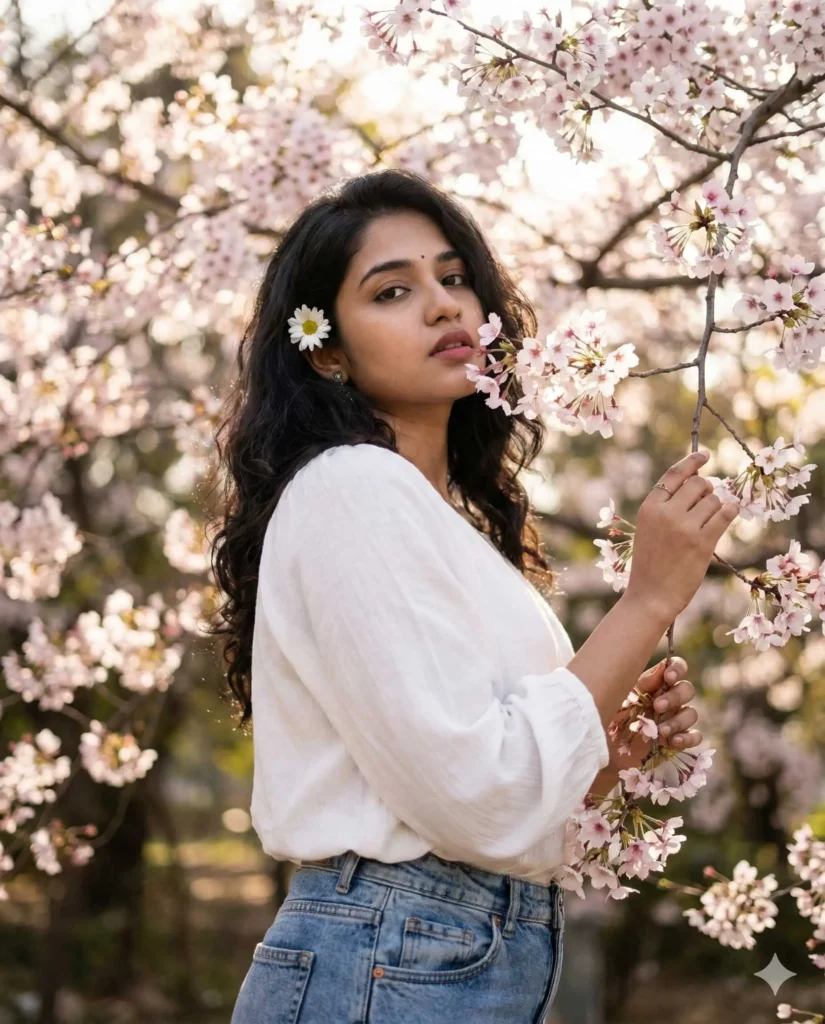
Use the reference photo uploaded to create a hyper-realistic Ultra HD photo of me standing in a Cherry blossoms Tree wearing a White loose blouse and a wash blue jeans.

The scene is ethereal and my expression is sensual. I'm also touching the cherry blossoms branch with lots of flowers.

Make an ultra-clear hyper-realistic photo with bokeh effect.

Photorealistic style. Preserve my original face and facial features from the uploaded reference image.

Use natural soft daylight, beautiful pink cherry blossom flowers, realistic skin texture, detailed clothing fabric, and a dreamy outdoor atmosphere.

Professional DSLR photography, shallow depth of field, beautiful natural background blur, premium editorial quality.

The image should be in a tall, vertical portrait format corresponding to a 4:5 aspect ratio. Shot on DSLR, 85mm lens, f/1.8, ISO 100. Signature “editprotips.in.net” bottom right.
How to Use Photo Editing AI Prompts in Google Gemini
Follow these simple steps to create your AI photos:
- Open Google Gemini on your mobile or computer.
- Upload your original photo.
- Choose one of the Photo Editing AI Prompts from this article.
- Copy the complete prompt.
- Paste it into the Gemini chat box.
- Ask Gemini to generate your edited photograph.
- Wait for the image generation process to finish.
- Save your favorite result to your device.
Tips for Getting the Best AI Photo Editing Results
- Upload a clear photo: Use a high-quality reference image with a visible face.
- Use detailed prompts: Describe the background, outfit, pose, and lighting.
- Mention face preservation: Include instructions to maintain your original facial features.
- Choose the right aspect ratio: Use 4:5 for Instagram portraits and 9:16 for Stories and Reels.
- Try different styles: Experiment with café, traditional, winter, and nature themes.
- Check the final image: AI tools may sometimes change small facial or clothing details.
Frequently Asked Questions
What are the best Photo Editing AI Prompts?
The best prompts include detailed descriptions of clothing, poses, backgrounds, lighting, camera angles, and face preservation instructions.
Can I use these prompts in Google Gemini?
Yes. You can copy these prompts, upload your reference photo, and use them with Google Gemini’s image generation features.
How can I keep my original face in AI photos?
Upload a clear reference image and include instructions such as “Preserve my original facial structure and identity without changing my face.”
Are these AI photo editing prompts free?
The prompts shared in this article are free to copy. However, image generation availability and usage limits depend on the AI platform and your account.
Can I use these prompts for Instagram?
Yes. These prompts are suitable for creating stylish portraits, aesthetic pictures, and creative social media content.
Which AI photo style is trending?
Lifestyle café portraits, cherry blossom photoshoots, traditional fashion portraits, and festive winter photography are popular creative styles.
Conclusion
These 5 Photo Editing AI Prompts 2026 make it easier to create beautiful, realistic, and professional-looking photographs using AI tools. From modern café portraits to cherry blossom backgrounds and elegant Christmas photoshoots, you can experiment with different styles using your own reference picture.
Simply copy your favorite prompt, upload your photo to Google Gemini, and create your next stunning AI portrait.
Keep creating, keep editing, and stay connected with EditProTips for more trending AI photo editing prompts and creative ideas!